
Playbooks· 16 min read
Best Sales Intelligence Software in 2026: Five Tools Ranked on Research Depth
See how Swan, ZoomInfo, Sales Navigator, 6sense and Clay compare on research depth, pricing and rating. Pick the tool that turns research into action.
 Amos Bar-JosephCo-Founder & CEO ·
Quick Summary
Good sales intelligence software tells your team what’s new at a target account and which move to make. We compared five tools on research depth, shared context and what happens after a signal. Swan ranks first for teams that want research turned into next steps, since its GTM brain gives sales, marketing and CS one account history. ZoomInfo leads on data scale, and Sales Navigator leads on people research. Here’s how the top three compare.
| Tool | Best For | Starting Price | After a Signal Fires |
|---|---|---|---|
| Swan | Teams that need every piece of research to end in a next step | Usage-based credits, free trial | Checks the account’s history in the Brain, then drafts an action for approval |
| ZoomInfo | Enterprise teams after wide data coverage with AI briefs on top of the CRM | Custom quote | Shows it in Pulse Feed, and reps ask AI Chat for a summary |
| LinkedIn Sales Navigator | Reps who research people and warm paths on LinkedIn | $119.99/month (Core) | Sends a lead or account alert for the rep to follow up |
Why Research Depth Matters More Than Contact Counts
Your reps get very little time with buyers. Gartner found that buyers spend only 17% of their buying time meeting potential suppliers. When they compare several vendors, one rep may get just 5% or 6% of it. Every minute in front of a buyer has to count.
That puts the weight on preparation, and preparation is where teams struggle. In Outreach’s prospecting survey, 49% of sales teams named account research as the hardest part of email prospecting.
Most sales intelligence software still answers a narrower question: who works at this company, and how do I reach them? That matters. The harder question is what’s new at the account, who shapes the decision and what your team should do this week.
We ranked every tool below on that second question.
Why Listen to Us?
In its first full quarter on Swan, Elastic Path grew pipeline generation 20%. At Reflectiz, leadership answers 75% of its GTM questions without looping in Sales Ops. Brianne Thomas, VP Marketing at Elastic Path, puts it simply: “I like to think of Swan as my go-to-market brain.”
That’s the gap we built Swan to close. Research should end in a move someone makes, not a profile sitting in a tab. It’s our product, so it goes first. Where another tool fits your team better, its review says so.
What Is Sales Intelligence Software?
Sales intelligence software gathers and sorts everything your team needs to know about target companies and their people. It pulls from data providers, public sources, your CRM and your own conversations.
The category is wide. On one end sit contact databases with emails, phone numbers and company size. On the other sit research tools that read signals, build account briefs and suggest what to do next.
Think of it as the difference between a phone directory and a colleague who has covered the account for three years. The directory tells you how to reach someone. The colleague tells you why now, who to start with and what to say.
Types of Sales Intelligence Software
The five tools in this guide each represent a different type:
- Contact and company data: Large B2B databases with firmographics and AI layered on top, like ZoomInfo.
- Professional network data: First-party people data and relationship paths, like LinkedIn Sales Navigator.
- Intent and predictive data: Account-level buying signals and scoring, like 6sense.
- Enrichment workflow builders: Tables you set up to pull and combine data from many providers, like Clay.
- Research and action platforms: Tools that research an account, keep the context and draft the next move, like Swan.
Plenty of teams run two of these side by side, usually a data source plus something that acts on it.
Why Sales Intelligence Software Matters
- It protects the little time you get with buyers: A rep who walks in knowing the account’s priorities can make a short meeting count.
- It lightens the research load: Salesforce’s 2026 State of Sales research says sellers spend nearly a full day of their week on prospecting.
- It rewards teams that lean in: The same research found high performers are 1.7 times more likely than underperformers to use AI agents for prospecting outreach.
- It keeps context in one place: Account history spread across inboxes, call notes and CRM fields is hard to act on, and it leaves when people leave.
- It tells you when to reach out: Buying signals like a pricing page visit or a new executive hire show which accounts to work first.
Top Sales Intelligence Software at a Glance
| Tool | Best For | Research Depth | Starting Price |
|---|---|---|---|
| Swan | Teams that need every piece of research to end in a next step | Account briefs, buying committee and meeting prep from one shared GTM brain | Usage-based credits, free trial |
| ZoomInfo | Enterprise teams after wide data coverage with AI briefs on top of the CRM | AI account briefs that combine CRM history, calls and ZoomInfo data | Custom quote |
| LinkedIn Sales Navigator | Reps who research people and warm paths on LinkedIn | AI summaries of accounts and leads, plus relationship maps (Advanced tiers) | $119.99/month (Core) |
| 6sense | Marketing-led teams running account-based programs | Account buying stages and AI briefs from intent data | Custom quote |
| Clay | GTM engineers who build their own research workflows | Whatever your team designs with Claygent and enrichment | Free plan; Launch from $167/month billed annually |
1. Swan
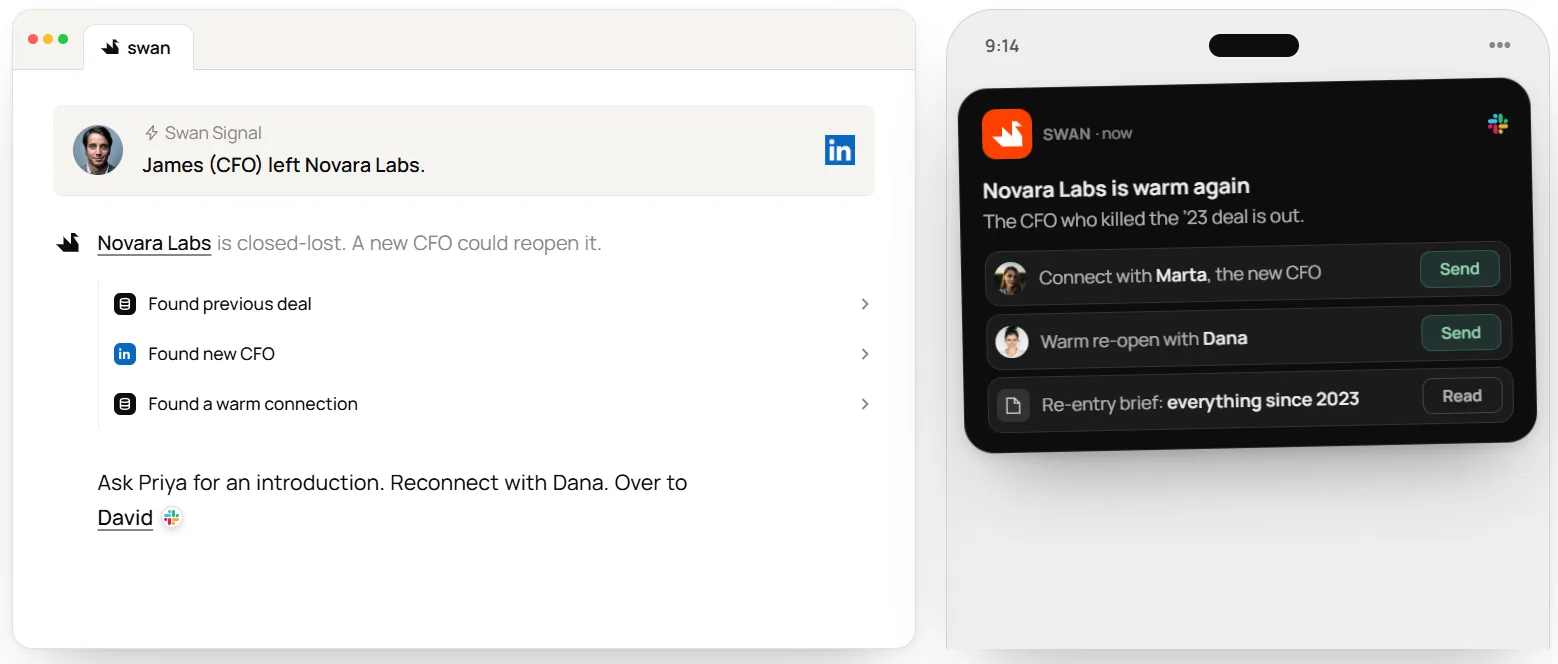
Swan, the AI GTM engineer, runs on a GTM brain. The Brain keeps a living profile of each account and person you sell to, fed by your CRM, calls, inbox and signals. Pick Swan when you need research that finishes with something your team can do today.
Before each run, Swan checks the Brain. Afterwards, it saves what it found. Every edit shows whether a teammate or Swan made it, and which run was behind it. Research stops living in one rep’s head and starts piling up on the account itself.
The same Brain serves the rest of the GTM team. At Finout, marketing builds signal digests for sales. At Utila, CS managers prepare customer conversations and look for upsell with the full buyer history in front of them. As Din Arbel, GTM Engineer at Utila, puts it: “it’s not just sales anymore - our whole customer success team is in Swan every day.”
Key Features
- The Brain: Store account and contact profiles alongside your ICP, competitor notes and playbooks, with an edit history on each one.
- Account research and meeting prep: Get background, news, tech stack, funding, competitors and the buying committee in one brief before the call.
- Signal triggers: Start research on website visits, LinkedIn engagement, business events like a new executive or funding round, third-party intent or HubSpot workflows.
- Approvals where you work: Review and approve each contact’s sequence in the app, in chat or in Slack.
- Waterfall enrichment: Find emails, phones and technographics across 40+ providers, with credits charged only when data comes back.
- 50+ integrations: Connect HubSpot, Salesforce, Gong, Slack, Outreach and more.
Pricing
Swan bills for work done, not seats. Teams share one monthly credit pool, and only people who use Swan or approve its work need a seat. Credits roll over, annual plans save up to 20%, and the 14-day trial needs no card. See plans.
Pros
- One account history serves sales, marketing and CS, so nobody starts a handoff cold.
- Research can end in a drafted action that’s ready for approval, not a dashboard someone has to remember to check.
- Outreach waits for approval by default, and you can set individual sequences to send on their own.
- Every change to a record shows its source, so you can trace where a claim came from.
- You build new plays by describing them in plain English, with no engineering ticket.
- Alerts and dashboards don’t need a seat, so the whole GTM team can see what Swan finds.
Cons
- Swan is built to run plays, not export lists. Teams that mainly want bulk contact downloads are better served by a data provider.
2. ZoomInfo
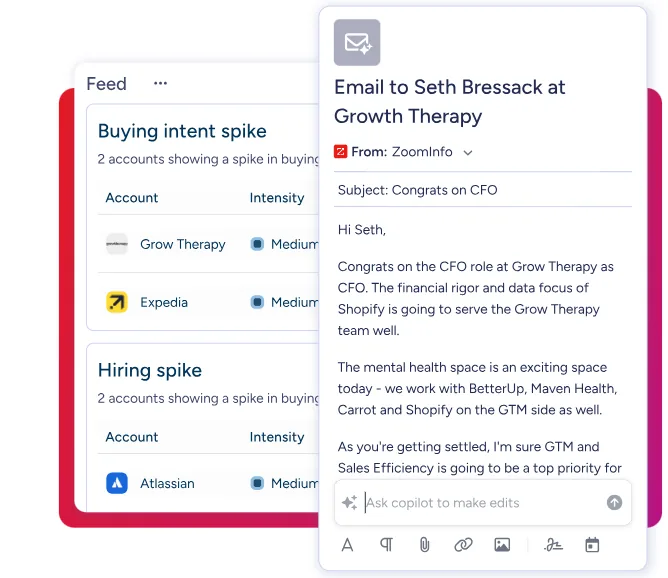
ZoomInfo is best known for its B2B database, which covers 500M+ contacts and 100M+ companies by its own count. For account research, the product to look at is GTM Workspace. It sits on top of your CRM and puts ZoomInfo data next to your own deal history. I
AI Chat is where the research happens. It answers questions about an account by combining your CRM records, call transcripts and ZoomInfo’s own data. Pulse Feed lists as many as 1,000 signals a day from more than 15 categories, including intent, funding and job moves. It’s a strong fit for enterprise teams already running Salesforce or Dynamics.
Key Features
- AI Chat: Ask questions about an account and get cited answers drawn from your CRM, calls and ZoomInfo data.
- AI Docs: Generate meeting prep briefs and deal status reports.
- Pulse Feed: Watch a daily stream of signals, from intent spikes to funding news.
- Intent and champion alerts: Unlocked on the Copilot Advanced tier and above.
Pricing
ZoomInfo doesn’t publish prices on its pricing page. You request a quote for Professional, Copilot Advanced or Copilot Enterprise.
Rating
- G2: 4.5/5
- Capterra: 4.1/5
Pros
- Broad data coverage means few accounts come back empty.
- AI Chat cites its sources, so reps can check a claim before repeating it.
- Pulse Feed collects intent, funding and hiring signals in one place.
Cons
- ZoomInfo’s license terms state the agreement isn’t cancellable, so you’re tied in for the term you sign.
- You can’t compare plans on price without a sales call.
- Outdated contact data is the complaint G2 reviewers raise most often.
3. LinkedIn Sales Navigator
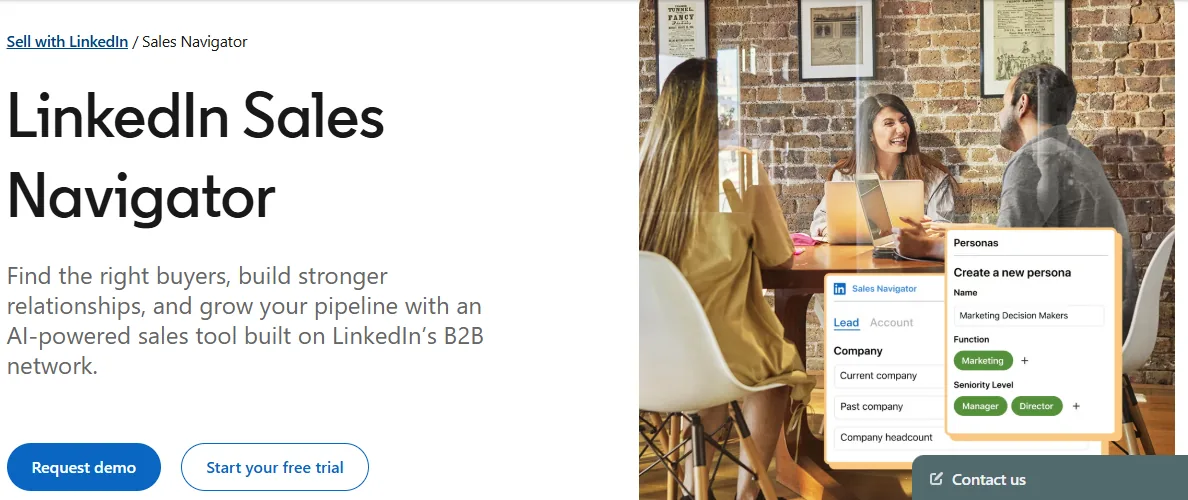
Sales Navigator puts LinkedIn’s network of more than a billion members behind a search built for sellers. Its research strength comes from the source. Members keep their own profiles up to date, so roles, moves and activity are first-hand.
On the Advanced tiers, Account IQ summarizes an account’s priorities, and Lead IQ gives a quick AI read on a person. Relationship Map shows the decision-makers on an account and helps spot who’s missing, while TeamLink shows which colleagues already know the buyer.
Key Features
- Account IQ and Lead IQ: Get a short AI overview of a company’s priorities or a buyer’s background (Advanced tiers).
- Relationship Map: Build a shared view of the decision-makers on an account (Advanced tiers).
- TeamLink: Find warm paths through your colleagues’ networks (Advanced tiers).
- Buyer Intent: See which companies are showing interest in you (Advanced tiers).
Pricing
Plans listed on LinkedIn’s compare plans page:
- Core: $119.99/month, or $1,079.88/year
- Advanced: $159.99/month, or $1,799.88/year
- Advanced Plus: Price on request from LinkedIn’s sales team
LinkedIn notes these prices are estimates and may exclude taxes. Eligible members can start a free trial on Core or Advanced.
Rating
- G2: 4.3/5
- Capterra: 4.6/5
Pros
- Profile data comes from members themselves, so job changes show up quickly.
- Relationship tools help reps reach several people on a buying committee.
- Core has a published monthly price, so one rep can start without a long contract.
Cons
- CRM sync with write-back only comes with Advanced Plus, and that tier has no public price.
- You can’t export lead lists to a spreadsheet, so moving prospects into other tools means manual copying.
- G2 reviewers often call it expensive for what individual reps actually use.
4. 6sense
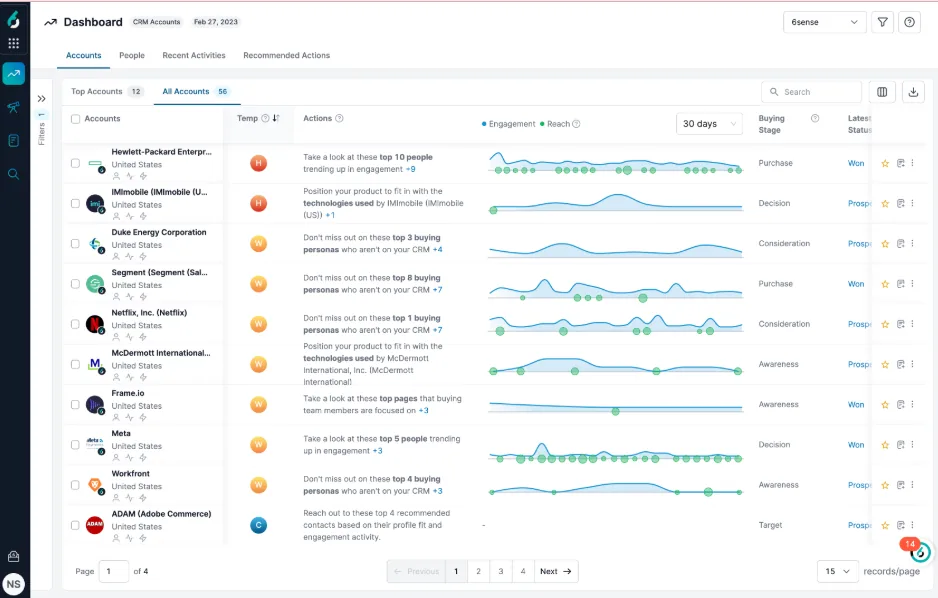
6sense tracks which companies are looking into your category and estimates where each one sits in its buying journey. It suits marketing-led teams running account-based programs, with sales working from the same priority list.
The engine is intent data. 6sense resolves anonymous web traffic to a company and scores every account across five buying stages each day, using first- and third-party intent. For sellers, the Sales Intelligence package adds account history, recommended contacts and RevvyAI, which writes an account or contact brief in about 30 seconds.
Key Features
- Account Buying Stage: Track five stages, scored daily from first- and third-party intent.
- RevvyAI: Get account summaries, decision-maker lookups and draft outreach, at no added cost for Sales Intelligence and Revenue Marketing customers.
- Sales Alerts: Get notified in Slack, email or the dashboard about new intent, web visits and competitor research.
- Predictive Models: Add predictive account scoring, sold as a paid add-on.
Pricing
6sense doesn’t list plans or prices on its pricing page. Its team builds pricing around your needs, with units like seats, credits and records priced in volume bands.
Rating
- G2 : 4/5
- Capterra: 4.5/5
Pros
- You can spot accounts doing research long before anyone submits a demo request.
- Buying stages give sales and marketing one shared priority list.
- RevvyAI briefs come included with the core packages.
Cons
- 6sense resolves intent only to the company, so you learn an account is in market but not who did the research. Reps lean on recommended contacts instead.
- Predictive models and AI email cost extra on top of the platform.
- G2 reviewers of Sales Intelligence most often flag inaccurate contact data.
5. Clay
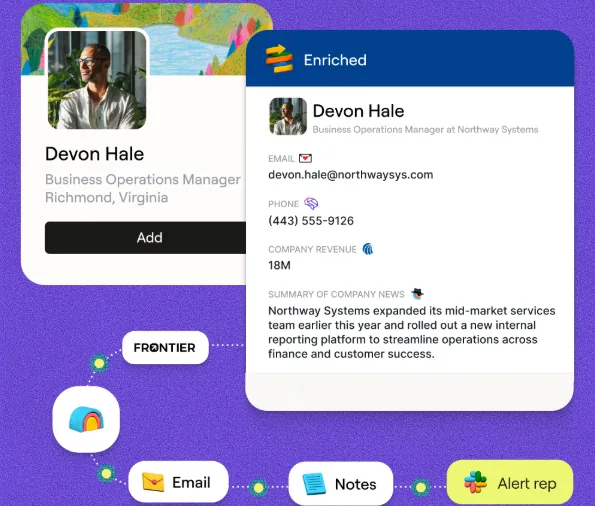
Clay gives you a table-based canvas for designing research and enrichment workflows yourself. It suits RevOps teams and GTM engineers who want control over every source and prompt.
Its research agent, Claygent, follows your instructions row by row and writes a structured answer, along with a reasoning trace you can inspect. With account context switched on, it can draw on your CRM, data warehouse and Gong calls.
Key Features
- Claygent: Run AI research agents that show their reasoning for each answer.
- Waterfall enrichment: Query providers in sequence from a marketplace of 150+ data providers.
- Signals: Track job changes, hiring, funding and tech stack changes, plus web intent on Growth.
- Account Agents (beta): Let agents watch accounts and write their conclusions back to each record.
Pricing
Plans listed on Clay’s pricing page:
- Free: No cost; 500 actions and 100 data credits monthly
- Launch: $167/month billed annually, or $185/month billed monthly
- Growth: $446/month billed annually, or $495/month billed monthly (includes CRM sync)
- Enterprise: Quote-based, on an annual commitment
Rating
- G2: 4.6/5
- Capterra: 5/5
Pros
- You control every data source, prompt and output.
- Reasoning traces make AI answers easy to audit.
- Every plan, including Free, comes with unlimited seats.
Cons
- Every run uses an action, and data bought from Clay’s marketplace also uses data credits.
- CRM sync only starts on the Growth plan.
- G2 reviewers often mention a steep learning curve.
Selection Criteria
How We Evaluated
Our ranking came down to one test: how well does each tool help you grasp what’s going on at an account and do something about it? Five criteria shaped the order:
- Research depth: Does it explain what’s new at the account and who drives the decision, beyond contact fields?
- What happens after a signal: Does the tool stop at an alert, or carry through to a written summary, a message or an assigned task?
- Cross-team context: Do sales, marketing and CS see one version of each account’s story?
- Upkeep: How much setup and ongoing care falls on your team?
- Pricing transparency: Can you see prices on the vendor’s own site before a sales call?
Every competitor price above comes from the vendor’s own pricing page, checked in November 2026. Ratings come from G2 and Capterra.
How to Choose
Start with the job you need done, then match the tool to it.
- You want research turned into next steps for the whole GTM team: Choose Swan. Every team reads from the same Brain, and each signal ends in a drafted move you approve.
- You need enterprise-scale data and AI briefs next to Salesforce or Dynamics: Choose ZoomInfo, and read the contract terms before you sign.
- Your reps sell through relationships on LinkedIn: Choose Sales Navigator. Core is the lowest-cost way in, though the AI research features start on Advanced.
- Marketing runs account-based programs and wants to know who’s in market: Choose 6sense.
- You have a GTM engineer who wants to build every workflow: Choose Clay.
Before you commit, run each shortlisted tool against 20 of your real accounts. Compare what each one tells you, and what your team can actually do with it the same day.
Choose the Tool That Takes Research All the Way to Action
Each of these five tools will teach you something about a target account. The difference is what happens next. Some hand your reps a record to read. Some flag an account and leave the follow-through to whoever notices. Few carry the research all the way to a move someone can make today.
If your reps still piece together context from five tabs before every call, your research stops short of action. Swan gives your GTM team a single brain to work from, and it converts each signal into an action that’s ready for your approval.
Start the free trial and see what Swan finds on your own accounts.
FAQs
Which AI sales intelligence tool is best?
For research that finishes with a move your team can approve, Swan is our pick. For quick reads on people and accounts inside LinkedIn, Sales Navigator’s Account IQ and Lead IQ are easy to adopt, though they need an Advanced plan. For AI briefs on top of a large database, look at ZoomInfo’s AI Chat.
What’s the difference between sales intelligence software and a CRM?
Your CRM records what your team has done, like deals, contacts and activity. Sales intelligence software brings in what’s happening at the account, from signals to research and buying committee changes. Most tools work alongside the CRM rather than replace it.
Is sales intelligence the same as intent data?
No. Intent data is one input to sales intelligence. It tells you which accounts are researching topics tied to what you sell. Sales intelligence also covers contacts, firmographics, relationships, account history and the research that turns all of it into a plan.
Is there free sales intelligence software?
Clay’s free plan includes 500 actions and 100 data credits every month. Swan offers a 14-day free trial with no payment method required. LinkedIn offers free trials of Sales Navigator Core and Advanced to eligible members, and ZoomInfo offers a free trial on its sales plans.
How much does sales intelligence software cost?
Costs vary widely. Sales Navigator Core is $119.99 a month per seat, and Clay’s Launch plan starts at $167 a month billed annually. ZoomInfo and 6sense quote custom prices. Usage-based tools like Swan and Clay scale with the work you run through them.
Can AI agents use sales intelligence data?
Yes, and more vendors now support it. ZoomInfo, 6sense and Clay all offer MCP servers that let AI assistants like Claude or ChatGPT query their data. Swan can also act as an MCP server for other agents and connect to custom MCP servers you bring.