
Playbooks· 13 min read
Unify vs Clay: Which AI Sales Platform Wins in 2026?
Unify vs Clay compared for 2026. See how each platform handles signals, sequencing, data, and pricing, plus which one is the best fit for your team.
swan teamThe team at Swan ·
Quick Summary
Unify and Clay overlap in some buying decisions, but they aren’t direct replacements for each other. Unify runs signal-based outbound campaigns from trigger to send, while Clay gives technical teams the data and workflow tools to build their own enrichment system.
If you need inbound and outbound in one platform, neither is a complete solution. This guide compares Unify and Clay to help you decide which is the better fit for your team.
| Dimension | Unify | Clay |
|---|---|---|
| Category | AI sales platform for warm outbound | Enrichment and workflow builder |
| Interface | Chat and agents | Spreadsheet tables |
| Data foundation | 1.1B+ people, 65M+ companies, and 40+ sources | 150+ providers with no proprietary data |
| Signals | Native library with dozens of triggers | Build them yourself |
| Sequencing | Multi-channel sequencing built in | External tool required |
| Managed deliverability | Yes, for Gmail and Outlook | None |
| Paid entry | $20/seat/month | $185/month |
| Free plan | Yes, for up to three seats | Yes, with a 200-row limit |
| Learning curve | Days | Two to four weeks |
| Best fit | Warm outbound teams | RevOps teams and GTM engineers |
Which Tool Fits Your GTM Motion?
The real choice between Unify and Clay is how much of your outbound system you want the software to run for you.
Unify is built for teams that want buying signals to trigger outreach with less setup. Clay gives technical operators more control, but someone still has to build the workflows and keep them running.
That makes Unify easier to launch, though its fixed approach can become limiting. Clay gives you more freedom, but the system is only as good as the person managing it.
This comparison covers where each fits and where each falls short. We’ll also look at where a third option might make more sense for teams that want coordination and flexibility in one place.
Why Listen to Us
Swan builds AI GTM software for B2B SaaS teams. Companies including Elastic Path and Machinery Partners use Swan to automate work across inbound and outbound.
At Elastic Path, Swan automated 90% of outbound and cut the rep tool stack from seven tools down to Slack. That hands-on work gives us a clear view of where Unify and Clay perform well, along with the gaps teams still need to solve.
Unify for AI-Run Warm Outbound
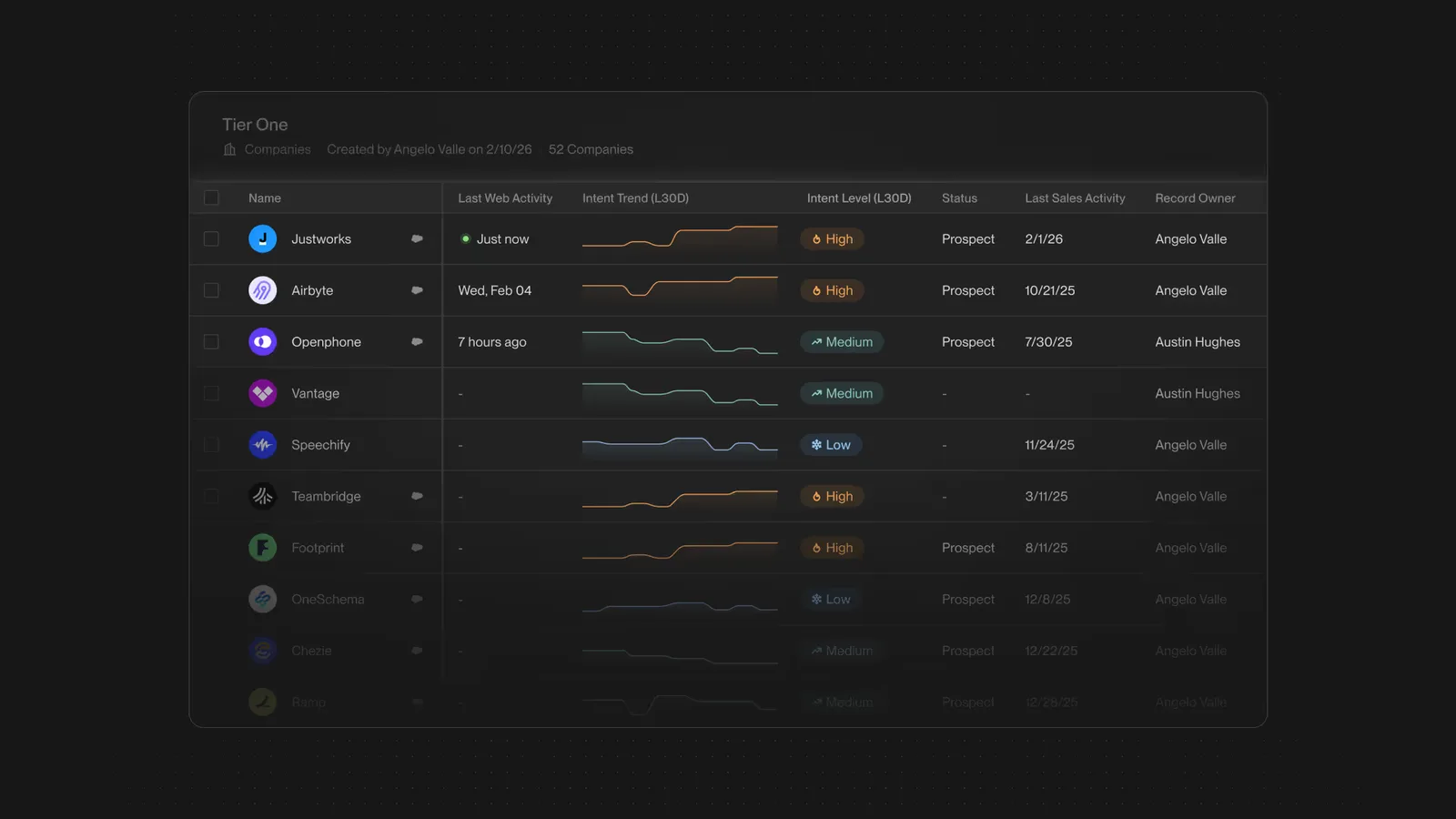
Unify is built for teams that want to act on buying signals without asking reps to research every account or build each sequence by hand. Sellers set the direction, then the platform handles much of the operator work behind the campaign.
Its chat-based interface is supported by more than 50 native skills. You can ask Unify to find 100 SaaS companies hiring SDRs, and it will build the list before drafting outreach. For lean teams, that means less time moving between research tools and sequencing software.
Data and Signals
Unify pulls from more than 40 data sources covering 1.1 billion people and 65 million companies. That gives teams a much larger prospect pool than they could build manually, while waterfall enrichment helps fill gaps when one provider cannot find an email address or phone number.
The signal library also helps teams reach out at the right time. Unify can track events such as new hires or funding announcements, then use that activity to start a campaign. Business-tier customers can add first-party website intent and product usage, which gives reps a warmer reason to contact an account.
Sequencing and Deliverability
Unify runs sequences across email, social outreach, and call tasks, with AI-generated copy added at each touch. Managed Gmail and Outlook mailboxes include warmup and bounce prevention, so teams do not need to piece together a separate sending setup before launching.
The built-in dialer is still in beta on the Business plan, so teams that rely heavily on calls may need another tool for now.
Automated Plays
The Business plan adds signal-triggered Plays. When a target account visits your website or announces new funding, Unify can enrich the account and enroll the right contacts in a sequence without waiting for a rep.
This helps teams respond while the signal is still fresh. It also reduces the chance that a promising account sits untouched because no one noticed the alert.
Best Fit
Unify works best for B2B SaaS teams that already know which signals they want to use and need help turning them into outbound campaigns. Customers include Perplexity and Cursor, and Unify says its platform has powered more than $786 million in pipeline. That track record points to a platform built for teams running outbound at scale.
Unify Pros and Cons
Pros
- Most teams can launch a basic campaign within days
- Managed deliverability removes the need for a separate Instantly or Smartlead subscription
- The chat interface lets non-technical operators run outbound without dedicated support
- Built-in signals cover common intent events without requiring custom setup
- Marketplace results show which provider supplied each data point, making vendor review easier
Cons
- Plays, the dialer, website intent, product usage, and full CRM sync require a custom-priced Business contract
- Phone enrichment uses about four times as many credits as email, which can make costs harder to predict at scale
- Managed mailboxes support Gmail and Outlook but not Zoho or other providers
- Fixed workflows offer less control outside Unify’s intended outbound motion
- Basic campaigns launch quickly, but more advanced Plays need careful setup before they run reliably
Clay for Custom Enrichment Workflows
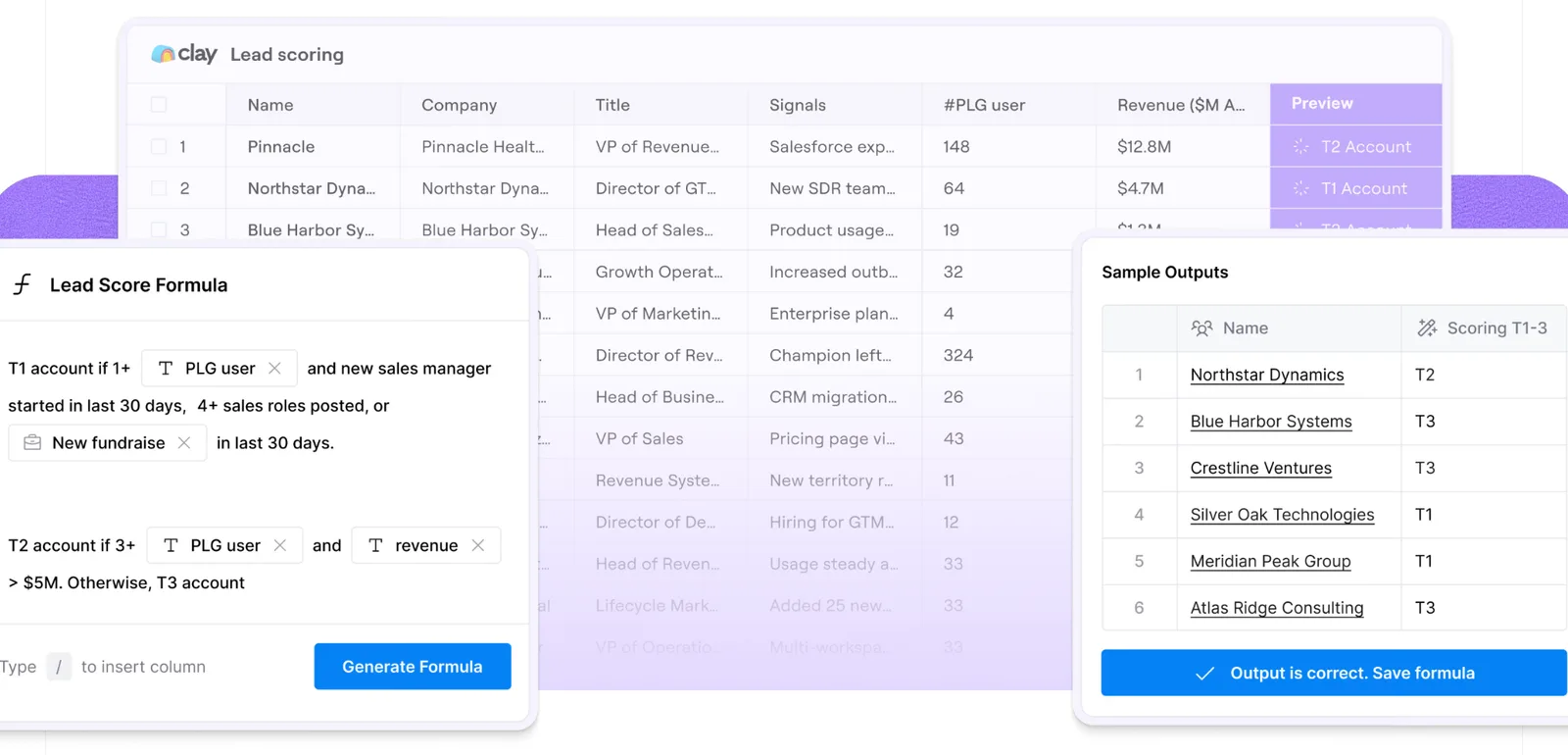
Clay is built for teams that want to design their own enrichment system instead of using a fixed outbound platform. Its interface works like a smart spreadsheet, with each column pulling data from Clay’s marketplace of more than 150 providers.
You can also use Claygent to research individual rows, while Sculptor turns plain-English instructions into workflows. That gives technical operators far more control over how accounts are researched and prepared before they enter a campaign.
Waterfall Enrichment
Clay’s main advantage is its waterfall enrichment. Rather than depending on one provider, it checks several in sequence until it finds the data you need.
If the first source cannot find an email address, Clay automatically tries the next one. That process can lift email match rates to 80% to 95%, compared with roughly 50% to 60% from a single-source tool.
For teams working in narrow markets or cleaning large lists, that higher match rate means fewer incomplete records and less time filling gaps by hand.
Credits and Usage Costs
Clay changed its billing model in March 2026 by splitting usage into Data Credits and Actions.
Data Credits pay for marketplace lookups. Actions cover the work performed inside a workflow, including enrichment steps, AI research, and CRM updates.
Because the two balances run down separately, costs can become harder to predict as workflows grow. A process that looks simple may use several Actions for every record, especially once you add research or push data into another system.
Integrations
Salesforce and HubSpot integrations are available on the Growth plan and above. Technical teams can also connect Clay to sequencers or internal systems through APIs and webhooks.
Bring-your-own-key support lets you keep using existing data contracts instead of paying for every lookup through Clay. That can lower costs for teams that already work with providers such as Clearbit or People Data Labs.
Best Fit
Clay is best for RevOps teams and GTM engineers who want full control over enrichment and have someone available to maintain the workflows.
Its template library can shorten the setup process, and users rate the platform 4.9 out of 5 on G2 across more than 200 reviews. Even so, most teams should expect a learning period of two to four weeks before they can build reliable workflows.
Clay Pros and Cons
Pros
- Waterfall enrichment can raise email match rates to 80% to 95%
- Bring-your-own-key support lets teams keep existing data contracts and avoid marketplace markups
- Paid plans include unlimited seats, so adding users does not raise the subscription cost
- Clay’s March 2026 pricing update reduced marketplace data costs by 50% to 90%
- An active community and large template library can help new operators get started faster
Cons
- Separate Data Credits and Actions make costs harder to forecast as workflows grow
- Unused Actions expire each month instead of rolling over
- Teams may need a technical operator or two to four weeks before workflows run reliably
- Workflows can become difficult to maintain when the main Clay operator leaves
- Clay stops at enrichment, so sequencing and deliverability still require other tools
Pricing Comparison
Unify and Clay can look almost identical at the starting price, but the total cost depends on what happens after your data is enriched. Unify includes outbound execution, while Clay still needs other tools to send outreach.
Unify Pricing
- Free: $0 for up to three seats
- Base: $20 per seat per month with 800 credits per seat
- Pro: $60 per seat per month with 2,400 credits per seat
- Business: Custom annual pricing, with managed mailboxes at $25 each per month
Email enrichment usually costs one credit per record, while phone enrichment uses about four. Unify’s older $1,740-per-month Growth plan is no longer current.
Clay Pricing
- Free: $0 with 500 Actions and 100 Data Credits per month
- Launch: $185 per month, or $167 with annual billing
- Growth: $495 per month, or $446 annually
- Enterprise: Custom pricing, with Vendr reporting an entry point near $30,000 per year
Clay charges separately for Data Credits and Actions. A 10-step workflow across 1,000 contacts can use 10,000 to 25,000 Actions.
Which Costs Less?
A three-person team would pay $180 per month for Unify Pro or $185 per month for Clay Launch.
Unify includes sequencing and managed deliverability. Clay handles data preparation, so a sequencer and deliverability tools may add another $50 to $200 per month.
Where Both Fall Short
Unify and Clay each solve a specific part of the GTM process, but neither carries an account through the full funnel.
Unify’s Limits
Unify is strongest in warm outbound. It can respond to a buying signal and enroll a contact in a sequence, but inbound routing and account expansion still happen elsewhere.
Its Plays also need careful setup before they can run reliably. Lean teams may spend more time deciding which signals should trigger outreach before the automation starts saving work.
Clay’s Limits
Clay stops once the data is prepared. You still need separate tools for sequencing and mailbox management, while calling requires another platform.
Someone also has to maintain every table and workflow. When that operator leaves, the logic behind the system can leave with them.
Execution or Flexibility
Unify handles more of the outbound work but gives teams less control over how each play runs. Clay offers more flexibility, though your team is responsible for building the system and keeping it working.
Most teams still use either platform alongside three to five other tools. Running both can close more gaps, but it also raises credit costs and adds more maintenance.
The Context Gap
Neither platform keeps a complete account history across your GTM stack. A website visit may connect to a CRM record, but earlier conversations or an active opportunity can remain in another system.
That missing context makes it harder to choose the right follow-up and becomes even more noticeable when a rep leaves.
How Swan Closes Both Gaps
Unify gives you more execution, while Clay gives you more control. Swan combines both across the full GTM stack, so teams do not need to run separate platforms for signals, research, and outreach.

Reps Spend Less Time on Research and Admin
Swan catches buying signals and researches each account before it reaches a rep. Instead of moving between five tools to decide who to contact, reps start with accounts that are already prepared.
Inbound Leads Get Followed Up
When a target account visits your pricing page, Swan enriches the account and starts the right play. Sales can respond while interest is still fresh instead of relying on someone to notice an alert in Slack.
Account Context Stays With Your Team
Swan records account activity and play decisions in your CRM. When a rep leaves, the next owner can see the full history instead of rebuilding it from scattered notes.
Teams Build Plays Without Engineering
You can describe a play in plain English, and Swan builds and runs it. Marketing can launch new workflows without opening an engineering ticket, while RevOps can update them as priorities change.
Plays Continue Beyond the First Meeting
Swan can run re-engagement and account expansion plays instead of stepping away once a meeting is booked. It also updates the CRM as each play runs, so later stages do not depend on another manual handoff.
Your Existing Tools Work Together
Swan connects signals from tools such as HubSpot, Slack, LinkedIn, sequencers, and data providers. Rather than replacing everything at once, it coordinates the work across your existing stack and takes the next action when new activity appears.
Swan Pros and Cons
Pros
- Covers the GTM funnel from inbound routing to outbound, with expansion plays included
- Builds plays from plain English, so marketing and RevOps can launch them without engineering help
- Works across your CRM, Slack, sequencer, and data providers instead of forcing you to replace your stack
- Logs every play and account interaction in your CRM, so context stays when a rep leaves
- Offers hands-on onboarding, with most customers seeing value within days
Cons
- Newer to market than Unify or Clay
- Best fit for teams with a defined GTM motion, so pre-PMF founders should probably start smaller
- Requires an established GTM stack to plug into, since Swan works across your existing tools rather than replacing them
Unify vs Clay vs Swan Full Comparison
| Category | Unify | Clay | Swan |
|---|---|---|---|
| Category | AI sales platform | Enrichment + workflow builder | AI GTM engineer |
| Primary interface | Chat + agents | Spreadsheet tables | Natural language plays |
| Data foundation | 1.1B+ people, 40+ sources | 150+ providers, no proprietary data | Works across your existing providers |
| Signal library | Native, dozens of triggers | Build them yourself | Native + your existing stack |
| Sequencing | Multi-channel built in | External tool needed | Multi-channel + inbound routing |
| Managed deliverability | Yes (Gmail + Outlook) | None | Yes |
| Dialer | Beta on Business tier | None | Included |
| CRM sync | Read-only on Pro, read/write on Business | Growth tier and up | Full read/write across plans |
| Inbound routing | Outside the design | None | Yes |
| Expansion plays | Outside the platform | None | Yes |
| Free plan | Yes (3 seats, limited credits) | Yes (200-row limit) | Free trial |
| Paid entry | $20/seat/mo | $185/mo | Credit-based pricing starts at $100 for 625 credits |
| Enterprise entry | Quote-only | ~$30K/year | Custom |
| Onboarding time | Days to weeks | 2 to 4 weeks | Minutes to hours |
| Best fit team | Warm outbound teams | RevOps and GTM engineers | Full-funnel B2B SaaS revenue teams |
Run Your GTM Motion in One Place
Unify helps teams execute outbound, while Clay gives technical operators more control over enrichment. Swan connects both sides across your existing stack, so signals can turn into action without another manual handoff.
See how Swan can work across your GTM stack. Start your free trial today.